What is a digital restaurant waitlist?
A digital restaurant waitlist is software that replaces the paper clipboard at the host stand. Guests are added by the host or add themselves by scanning a QR code, each party shows a live position and estimated wait, and the guest gets a text when their table is ready. The host works the same list from a tablet or laptop, and every visit is recorded, so the restaurant learns its real wait times instead of guessing them.
This is more than a technology upgrade for its own sake. The shift from paper to digital solves a set of operational problems that hit the bottom line directly: lost guests, slow table turns, no-show confusion, and zero visibility into your own performance. A restaurant running a digital waitlist is capturing revenue that paper-based restaurants leave on the table every night.
This guide walks through every part of restaurant waitlist management: how to choose an app, how the technology works, how guests interact with it, and how to use the data it produces.
Which waitlist app should a restaurant choose?
The restaurant waitlist market has a handful of serious options, and they differ less on features than on three things: whether texts are included, whether there is a plan a small restaurant can run for free, and whether the tool works beyond restaurants if you ever open a bar, a bakery, or a second concept. The table compares the four tools small restaurants shortlist most often.
| Capability | MakeTheQueue | Yelp Guest Manager | Waitlist Me | Waitwhile |
|---|---|---|---|---|
| Free plan | Yes, stays free | No, paid plans only | Yes, limited free tier | Trial and entry tier |
| Guests join by QR code | Yes | Via Yelp page, not QR | Not offered | Yes |
| Table-ready texts | Paid plans, included | Yes | One-way texts | Yes |
| Guests can reply by text | Yes, paid plans | Limited | No | Higher tiers |
| Self check-in kiosk | Yes, all plans | Yes | Basic | Yes |
| Lobby TV display | Yes, all plans | No | Basic | Yes |
| Table map | No (party size at join) | Yes | Yes | Not listed |
| Works for non-restaurants | Yes | No | Yes | Yes |
| Pricing model | Flat monthly, no per-seat fees | Restaurant-only tiers, annual contract typical | Free tier, then paid tiers | Tiered, features unlock by tier |
Read that table with your own restaurant in mind. If most of your guests find you on Yelp and you want them to join from your Yelp page, Yelp Guest Manager earns its price. If you want a free list and nothing else, Waitlist Me will carry a small room. If you need a table map, both of those have one and MakeTheQueue does not: we capture party size when the guest joins and use it to quote the wait, but we do not draw your floor. If you want texts included, guests who can reply, a kiosk, a lobby board, and a plan that stays free, that is the corner MakeTheQueue was built for, and the Waitwhile comparison covers the closest alternative in detail.
Paper versus digital, side by side
Take two identical restaurants on the same Saturday night, one on a clipboard and one on a digital waitlist.
| Moment | Paper clipboard | Digital waitlist |
|---|---|---|
| Arrival | Host writes 'Martinez, 6' and guesses 20 minutes | Host adds the party in three taps; the guest sees position and estimate |
| Table opens | Host shouts the name across a loud lobby | Guest gets a text while browsing next door |
| No answer | Host shouts again, waits, moves on | Not applicable; the guest walks in 90 seconds after the text |
| Guest returns | Argument about whether they lost their spot; list re-sorted | Not applicable |
| Table empty for | Four minutes or more | Under two minutes |
| Record kept | None | Wait time, party size, outcome |
Scale that difference across 80 to 120 parties on a busy night and the gap is enormous. The paper restaurant bleeds minutes every turn to miscommunication and manual list management. The digital restaurant recaptures that time as additional seated covers. At a typical average check, one extra turn a night is serious money over a month.
How do guests join by QR code?
The simplest way for guests to join is by scanning a QR code. Here is how it works with MakeTheQueue:
- You print the QR code for your location from the self check-in settings and put it on a table tent at the host stand, a sidewalk A-frame, your website, or your Google Business listing.
- A guest scans it with their phone camera. No app download. A mobile web page opens where they enter their name, party size, and mobile number, then tap join.
- The guest immediately sees their position in line and a note that they will be texted when the table is ready. They can close the browser and go about their evening.
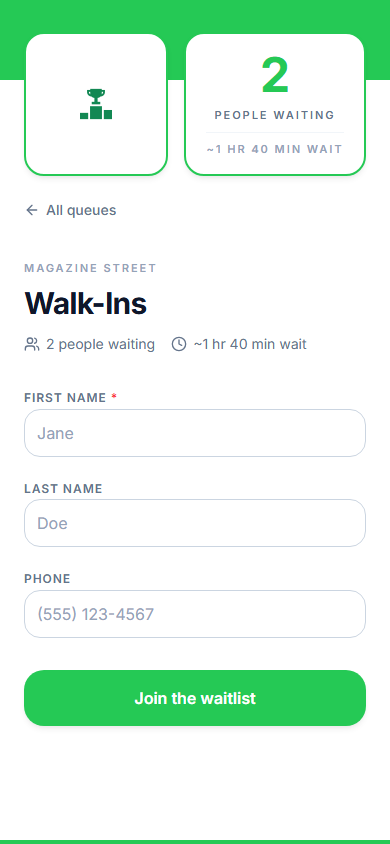
This matters because it removes the host stand as a bottleneck. During a dinner rush, every guest who joins before reaching the door is one less interruption for your host. For restaurants in high-traffic areas, the QR code also acts as passive marketing: a sidewalk sign that says 'Join our waitlist, skip the line' captures walk-by traffic that would otherwise pass you by. The join page carries your logo and colors, so guests see your brand rather than a generic form.
How table-ready texts and replies work
Texting is the backbone of a modern restaurant waitlist because it meets guests where they already are. No app, no account, no push notifications to enable. In practice there are two directions:
- Restaurant to guest: automatic texts at key moments, when the guest joins, when they are getting close, and when the table is ready. Each message is a template you can edit; the text message templates post has twelve you can copy.
- Guest to restaurant: guests can reply to any of those texts. 'Running five minutes late,' 'can we add two more?', or a one-word cancel. Replies land on the party's entry in the host's dashboard, so the host adjusts the list without a phone call or a trip to the lobby.
The impact on no-shows is the big win. Without a reply channel, a guest who decides to leave has no easy way to tell you; they disappear, and your host finds out when the name is called to nobody. With replies, guests who change plans cancel with one word, the host sees it instantly, and the next party gets notified. Every no-show you convert into a cancellation is a table slot you get back, which is the whole argument for replacing coaster pagers with a text.
Reservations and walk-ins in one queue
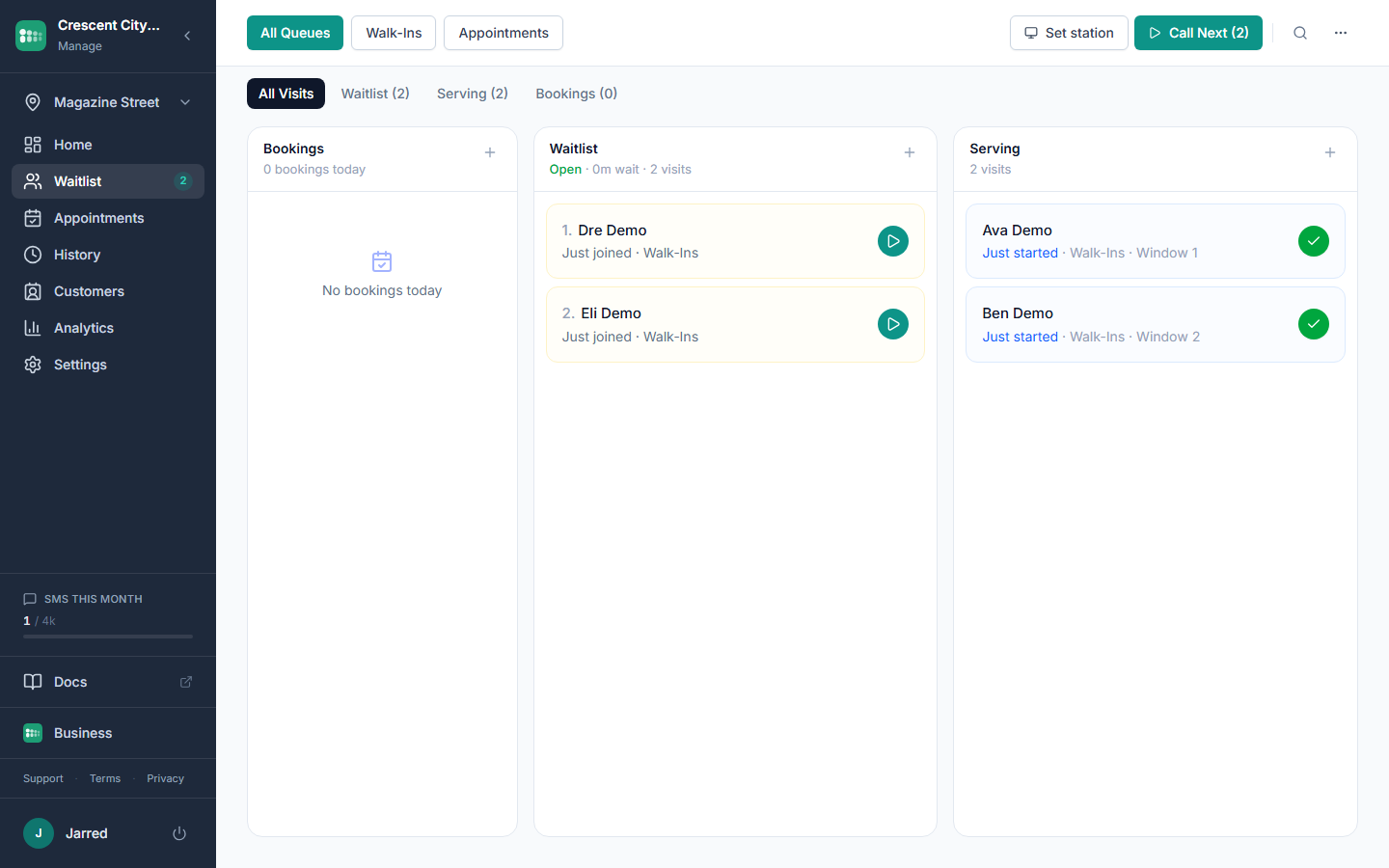
One of the most common pain points in restaurant queue management is the collision between reservations and walk-ins. A party with a 7:00 PM reservation arrives at 7:10 and expects immediate seating, but a walk-in party that has been waiting since 6:40 is next in line. Who gets the table? With separate systems the host makes a judgment call from incomplete information, someone feels slighted, and a bad review gets written.
The solution is to manage both streams in one place. Booked-ahead parties and walk-ins appear on the same screen with their times, so the next-table decision is made with full information instead of two lists and a guess. When a reservation runs late, the host can confidently seat the next walk-in, because the whole picture is right there.
Lobby display boards and perceived wait
Uncertain waits feel far longer than known waits. A guest who is told 'about 20 minutes' and then hears nothing for 25 feels like they have waited an hour. A guest who can see a live board showing they are fourth in line, with the list updating as parties are seated, feels like things are moving even when the actual wait is the same.
A display board turns any TV or tablet into a live now-serving and waiting board. It shows first names and last initials only, never phone numbers, and it refreshes on its own. The operational benefit goes beyond psychology: when the lobby has a display, guests stop approaching the host to ask 'how much longer?', a question that gets asked dozens of times a night. A cheap TV on the wall reclaims that time. Paired with a kiosk, it is a digital take-a-number system for the host stand.
Kiosk mode for the host stand
During a dinner rush the host is doing five things at once: greeting guests, adding names, managing the queue, answering the phone, and coordinating with servers. The moment a line forms at the door, the host becomes the bottleneck.
Kiosk mode turns a tablet into a self-service check-in station. Guests walk up, enter their name and party size, and they are on the list. Large buttons, minimal fields, and an automatic reset after each check-in so the next guest sees a clean screen. Place it at the entrance or on a stand near the host podium; guests who arrive while the host is seating a party check themselves in instead of waiting. It runs on any tablet in a regular browser and carries your branding.
Analytics and peak-hour staffing
The most valuable thing a digital waitlist gives you is not the list. It is the data. Every party that joins, waits, and is seated becomes a record, and over a few weeks those records reveal patterns that are invisible on paper:
- Average wait by hour and day. You might find Wednesday dinner waits creeping up for a month, a sign you need an extra server on Wednesdays rather than Thursdays.
- Peak hours. Hourly volume shows exactly when demand spikes, so you stagger shifts and breaks around your real rush.
- Service breakdowns. Track bar seating against dining room, or lunch against dinner, and see which drives the longest waits.
- Trends. Is lunch growing? Is Sunday brunch declining? When you want to dig deeper, export everything to a spreadsheet.
Multi-location restaurant groups
For groups with two or twenty locations, waitlist management gets more complex, not just bigger. Each location has its own flow, peak hours, and staffing challenges, and without a shared tool each manager runs an island. Multi-location support puts every location under one account with its own queues, branding, join page, and hours, and lets you view analytics across the group or drill into one site. Maybe the downtown location needs a kiosk because the host is overwhelmed, while the suburban one needs earlier texts because guests park farther away. See adding a location for how it is set up.
Getting started
If you run a paper waitlist today, the switch is simpler than you think. With MakeTheQueue you can be live in under 15 minutes:
- Create your account and confirm your restaurant location.
- Create a queue and pick which fields guests fill in (party size is on by default).
- Print your QR code and put it at the host stand.
- Optional: set up a tablet as a kiosk at the door.
- Optional: open the display URL on a lobby TV.
There is no hardware to buy and no onboarding call. Your host uses it on the first night, and within a week you have enough data to start fixing your schedule. It starts free, and every new account begins with a full Business trial so you can try texts and reservations before you pay for anything.