A virtual queue app your customers never have to download
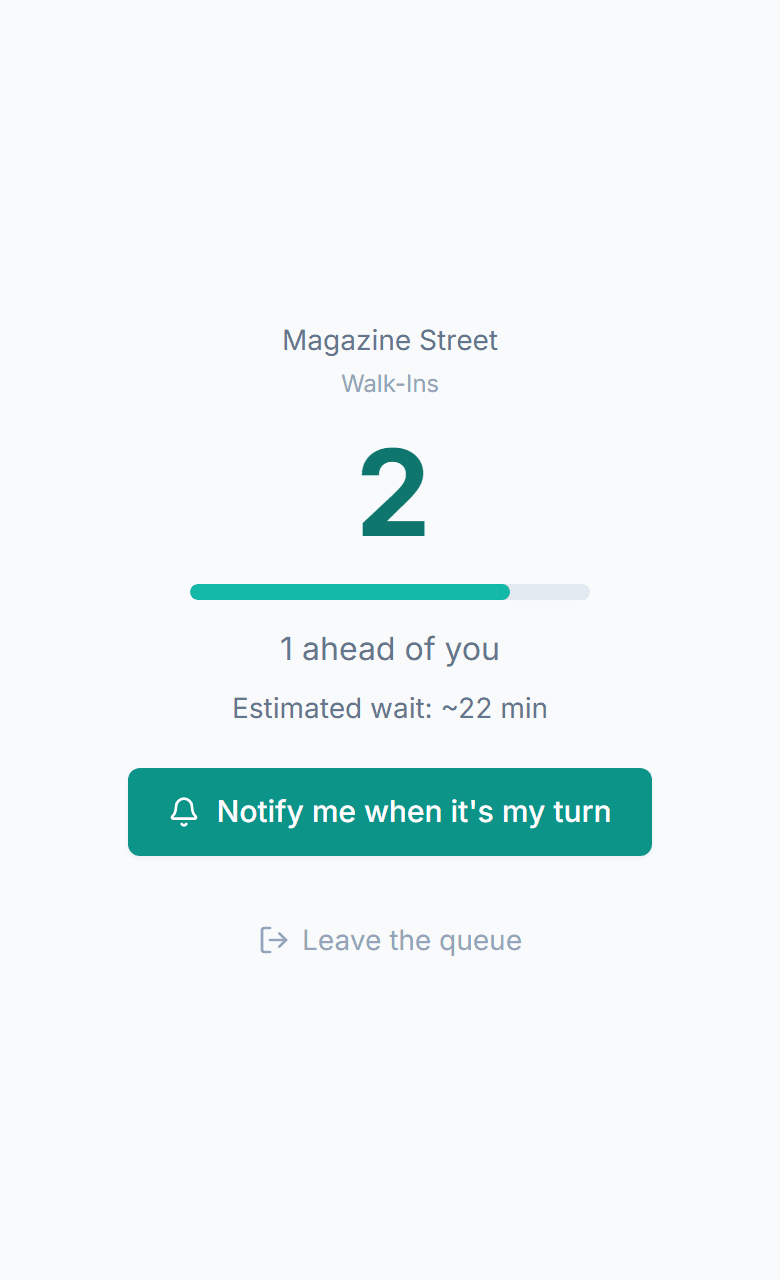
The queue runs in their phone's browser. A customer scans your QR code, types a name and mobile number, and gets a live page showing their place in line and the estimated wait. They can walk away, and a text brings them back when it is their turn.
No credit card required. Free plan that stays free.
What a virtual queue app is
A virtual queue app lets customers hold a place in line without standing in it. They join from their phone, usually by scanning a QR code, and can leave while the software tracks their position. When their turn is near they get a text to come back. The order of service does not change; only the waiting moves off your floor and onto their phone.
- Joining takes one scan and one short form; there is no app store, no download, and no account for the customer
- Each customer gets a personal status page: position, estimated wait, and the option to leave the line
- The page updates on its own as people ahead are served
- A text goes out when they are getting close and again when you are ready; they can reply to confirm, cancel, or ask for more time
- Staff work the same line from a browser dashboard and call the next person with one button
- The line still exists, in order, on the dashboard and on the waiting room display; it is just not a line of bodies
What the customer gets
Live status page
Position in line, estimated wait, your business name and colours, and a leave button. It refreshes itself while they wait, while they are being called, and while they are on hold, so the number they see is the number on your dashboard.
A text when it matters
A getting-close text a few places out, then a ready text with a grace period. Both are worded by you. Texts are on paid plans; the free plan sends the same alerts by email.
Contactless join
A printed code at the door, a link in your Google Business Profile or Instagram bio, a widget on your site, or a tablet kiosk. Every route lands on the same join form and the same queue.
Leave and come back
Nothing about the place in line depends on being present. Customers sit in the car, walk to the coffee shop, or keep shopping, and the estimate on their page tells them when to head back.
Reply to update
Reply 1 to confirm they are on the way, 9 to cancel, or 2 to ask for a few more minutes, which moves them back a few places instead of dropping them. Staff can also message them directly from the entry.
Hold and reposition
If a customer steps away at the wrong moment, staff put them on hold rather than removing them. Their page switches to an on-hold screen and they come back into the order when they return.
How a virtual queue works
A virtual queue works by moving the line from the floor to the customer's phone. The customer scans a QR code or taps a link, enters a name and mobile number, and lands on a live status page that shows their position and estimated wait. They leave, get a text when they are near the front, and return when it is their turn. Staff call the next person from a dashboard and the queue advances automatically.
- 1
The customer scans the QR code at your door or taps your link
- 2
They pick a queue and a service if you offer several, then enter a name and mobile number
- 3
Their status page opens with their position and the current estimate; a confirmation text arrives with the link
- 4
They leave, and the page keeps updating as people ahead are served
- 5
A getting-close text fires a few places out, so they start heading back
- 6
A ready text tells them you are waiting; they reply 1 to confirm or 2 if they need a few more minutes
- 7
Staff mark them served, and the next customer's page moves up
Virtual queue vs pagers vs take-a-number vs paper
All four keep an order. They differ in what the customer can do while they wait.
| Virtual queue | Coaster pagers | Take-a-number | Paper list | |
|---|---|---|---|---|
| Range | Anywhere with a phone signal | A few hundred feet | Within sight of the board | Within earshot of the counter |
| Hardware to buy and maintain | None; any tablet or TV you already own is optional | Pagers, charger, replacements | Dispenser and display | Clipboard and pen |
| Customer can leave | Yes | Only within range | No | No |
| Customer can reply | Yes, by text | No | No | No |
| Live position | On their phone | No | Number on the wall | No |
| Wait estimate | Yes, from real service times | No | No | Whatever staff guess |
| Record of the visit | Every join, wait, and outcome | No | No | Thrown away |
What the customer notices
The wait feels shorter
A known wait with something to do in it is easier to sit through than an unknown wait spent staring at the counter. The status page answers the only question they had.
Nobody loses their spot
Stepping out for a coffee no longer costs the place in line. The order is kept by the software, not by standing still.
They are not tied to the lobby
The car, the shop next door, or a bench in the sun all work. The text finds them wherever they are.
They can change their mind politely
Running late, adding a guest, or cancelling is one reply, not a phone call to a busy front desk.
Where a virtual queue fits
- Restaurants
Guests browse the block instead of crowding the host stand, and come back to a table that is actually ready.
- Barbershops
A customer who sees a full shop through the window joins from the sidewalk instead of driving on.
- Salons
Walk-ins wait for the right stylist without sitting in the chair by the door.
- Events
Attendees hold a place at a full session or a busy booth while they see the rest of the floor.
- Counters and offices
Pair the phone queue with a kiosk and a now-serving screen for people who did not scan.
Frequently asked questions
No. MakeTheQueue runs in the phone's web browser. Customers scan a QR code or tap a link, join the queue, watch their place in line, and get a text when it is their turn. There is no app store, no account, and no download for customers or staff.
The join form and the status page are small web pages, so a weak connection is usually enough. If it is not, staff add the customer from the dashboard and call them from the waiting room display, and the text still goes out over the phone network when they are up.
Staff add them by name from the dashboard, or they check in on the tablet kiosk. Their name appears on the TV display with the rest of the list, and staff call them the old way when it is their turn. The order is the same for everyone regardless of how they joined.
Yes. The status page shows their position and the current estimated wait, and it updates as people ahead are served. You can turn the estimate off for a queue if you would rather show position only.
The link works for the life of the visit: while they are waiting, while they are being called, and while they are on hold. Once they are served or leave the line, the page shows that outcome instead of a position.
They tap the leave button on their page or reply 9 to a text, and their entry is marked as cancelled. Everyone behind them moves up and their estimates drop. Staff can see cancellations in the history.
Simple pricing. Start free, upgrade when you need more.
Start free and upgrade when you need texts, appointments, or more locations. Every new account includes a full Business trial.
Start free