A take-a-number system without the ticket machine
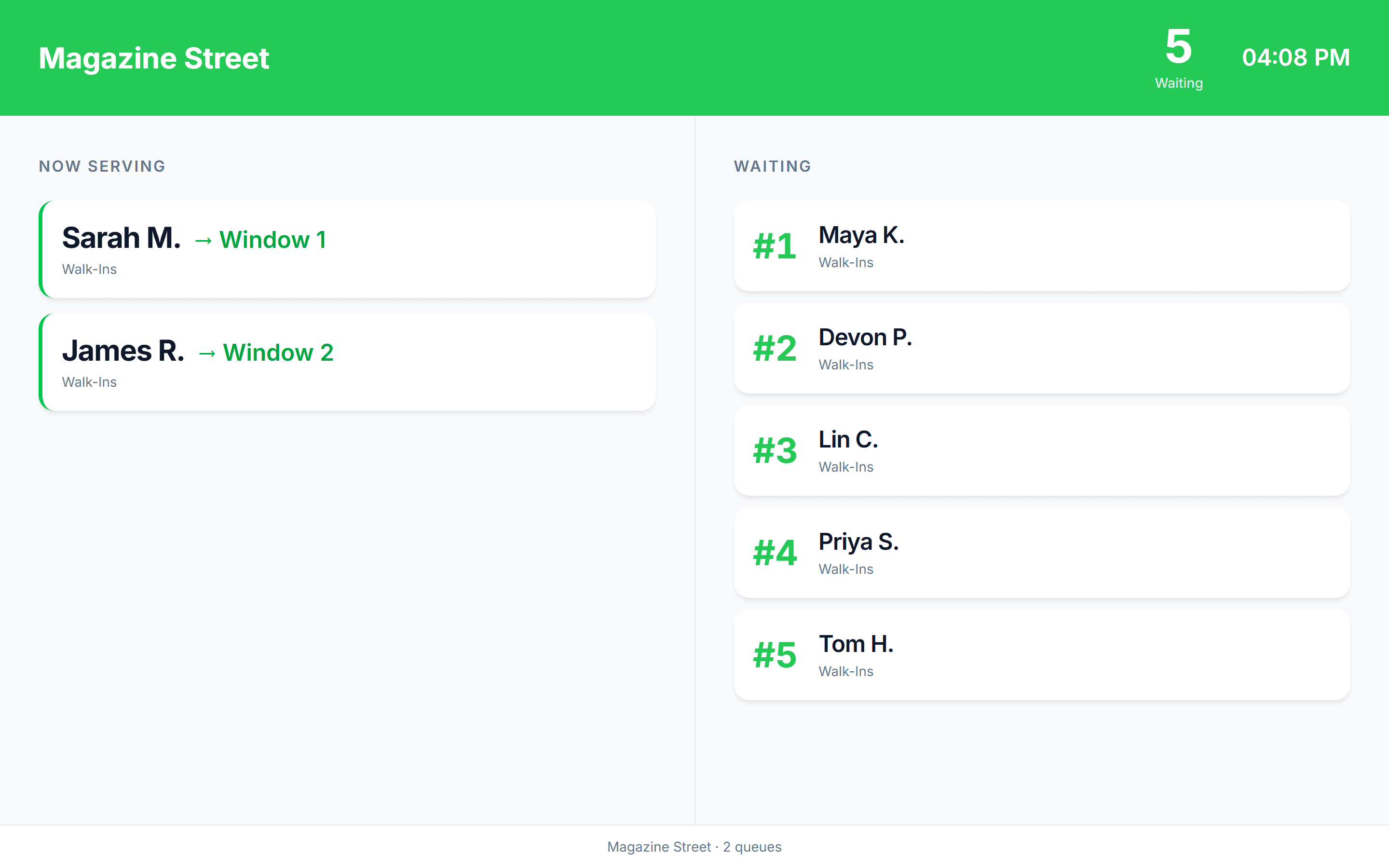
A spare tablet at the door takes the customer's name instead of handing out a paper ticket. Any TV with a browser shows who is being served and who is next. Customers who scanned the code get the same on their phone, plus a text when it is their turn.
No credit card required. Free plan that stays free.
Where the take-a-number machine falls short
A take-a-number system is a first come, first served queue where each arriving customer draws a number and waits for it to be called. The classic version is a ticket dispenser, a roll of numbered tickets, and a counter display on the wall. The digital version replaces the paper ticket with a tablet kiosk or a QR code scan, and the wall counter with a now-serving display and the customer's own phone. The order is the same; the customer no longer has to stay in the room, and the business keeps a record of every visit.
- Paper tickets run out, get dropped, and tell the customer nothing about the wait
- A number on the wall only helps the people standing under it
- The dispenser records nothing, so nobody knows how long Tuesday's waits really were
- The digital version keeps first come, first served, and adds names, estimates, texts, and history
What replaces the dispenser
Tablet kiosk
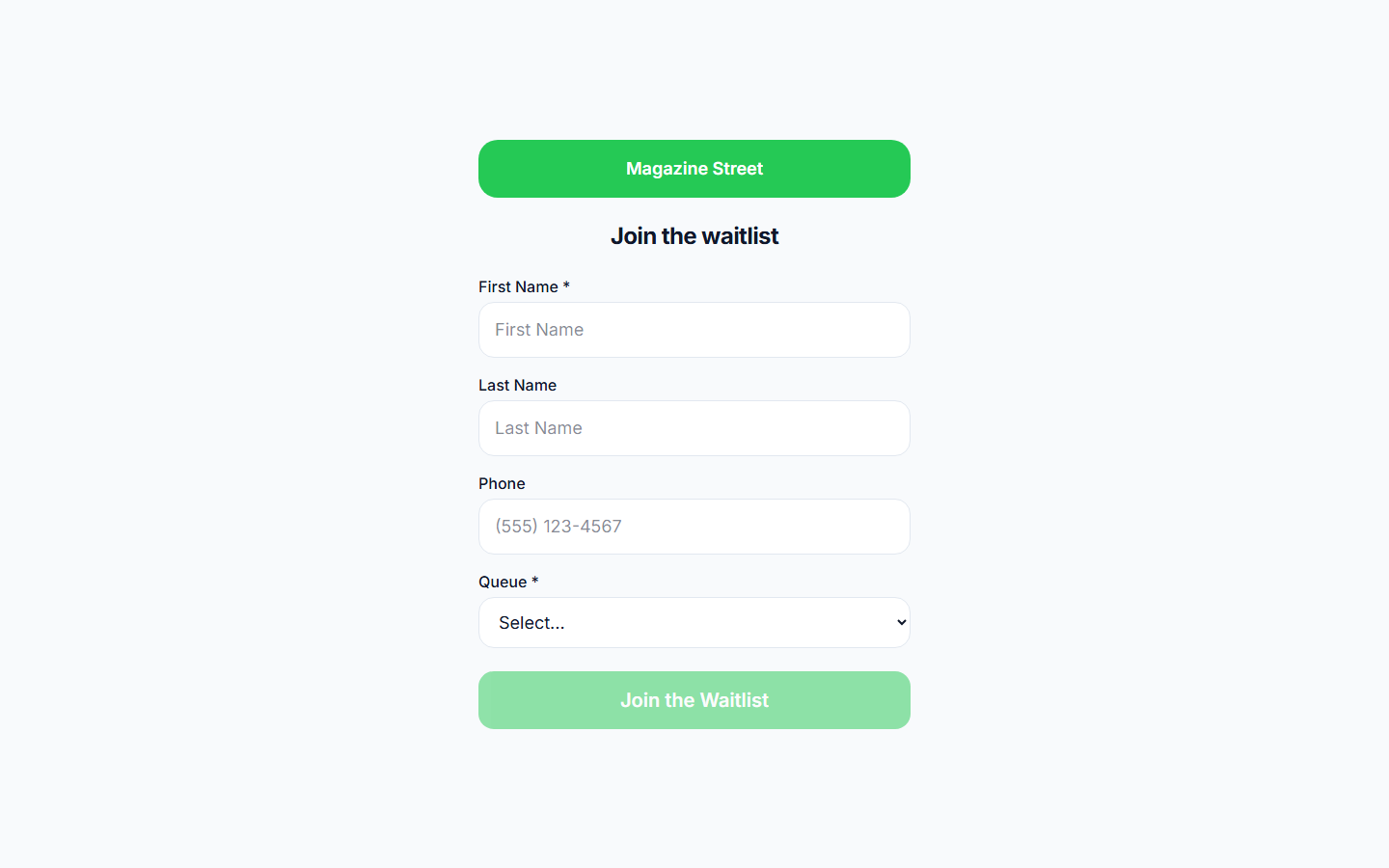
Any tablet runs the check-in form full-screen: queue picker, service picker, name, and whatever else you ask for. It resets itself after a minute of inactivity and closes outside opening hours.
Now-serving display
Open the display link on any TV with a browser. It shows who is being served, the waiting list in order with estimated waits, and uses first names and last initials so nobody's full name is on the wall.
Phone status page
Customers who scanned the code see the same position on their phone and can leave the building. The display covers everyone else.
Staff call next
One button calls the next customer in order, or staff pick a specific entry, put someone on hold, or move them up. Manual reordering is respected by call next.
Custom fields at the kiosk
Ask for an order number, a vehicle plate, or the reason for the visit as a dropdown. The answer shows on the entry so staff know what the customer needs before calling them.
Works without customer phones
A kiosk and a display are enough on their own. Phone numbers and texts are optional, which suits counters where many customers would rather not share a number.
How the digital version works
Same idea as the ticket roll, with the customer's phone doing the work of the ticket.
- 1
The customer taps the kiosk at the door or scans the QR code beside it
- 2
They enter a name and, if you want, a phone number or a custom field such as an order number
- 3
Their name appears on the now-serving display in the waiting area, and on their phone if they scanned
- 4
Staff press call next; the display updates and a text goes out to anyone who left a number
- 5
The customer walks up, is marked served, and the next name moves to the top
Take-a-number machine vs digital take-a-number
| Ticket machine | Digital take-a-number | |
|---|---|---|
| How the customer joins | Pulls a paper ticket | Taps a tablet or scans a code |
| What staff see | The next number | A named list with details and wait so far |
| What the customer sees | A number on the wall | A now-serving board, plus their own phone if they scanned |
| Customer can leave | No | Yes, with a text when it is their turn |
| Estimated wait | No | Yes, from real service times |
| Upfront cost | A dispenser, a counter display, and ticket rolls; commercial kits list for several hundred dollars | None if you use a tablet and a TV you already own; the free plan includes both |
| Record of the day | None | Every visit with wait, service time, and outcome |
| Ongoing cost | Ticket rolls, display repairs, and replacement parts | Free, or a flat monthly plan for texts and analytics |
Setting it up with a spare tablet and a TV
No proprietary hardware. The kiosk and the display are web pages.
- 1
Create the location and its queues
One queue for a single counter, or one per window or department. The kiosk shows a picker when there is more than one. Create your first queue
- 2
Open the kiosk link on a tablet
Put the tablet in a stand by the door, open the kiosk page full-screen, and pin it. It resets after each customer. Setting up a kiosk
- 3
Open the display link on the waiting room TV
Any TV with a browser, a streaming stick, or a small PC behind it works. The board shows now serving and the list in order. Waiting room display
- 4
Add the fields the counter needs
Keep the form short. A name is enough for the board; add a phone field if you want texts and a custom field if staff need a reference number. Kiosk custom fields
- 5
Print the QR code next to the kiosk
Customers who would rather use their own phone scan it and can leave the room. Both routes land in the same list. Join link and QR code
Where a take-a-number queue fits
Pharmacies
Prescription pickup and consultation as separate queues on one kiosk, with the board in the waiting area.
Walk-in clinics and offices
Name and phone at the kiosk, a now-serving screen in the waiting room, and a text for anyone who prefers to wait in the car. Nothing clinical is asked on the form.
Repair and service desks
An order number as a custom field, so the technician knows which job is up before calling the name.
Deli and bakery counters
A code on the case and a board above it, so customers keep shopping until they are next.
Front offices
Several windows as several queues, each with its own call next, on one display.
Retail pickup
Order pickup as its own queue, so collectors are not in line behind returns.
What the counter gets back
Names instead of numbers
Staff call a person, not a ticket. The greeting starts with the reason for the visit already on screen.
A waiting room that can empty
Customers who scanned can wait in the car or run an errand. The people who stay can see the board.
No ticket rolls to reorder
Nothing to refill and nothing to jam. The tablet and the TV are ones you already have.
Numbers for next week's rota
Visits per hour, average wait, and service time per queue, so staffing follows the record instead of the loudest complaint.
Frequently asked questions
A commercial take-a-number machine is sold as a kit: a ticket dispenser, a numbered counter display with a call button, and rolls of tickets you keep reordering. Office-supply retailers list those kits for several hundred dollars before ticket stock. The digital version runs on a tablet and a TV you likely own; MakeTheQueue's free plan includes the kiosk and the now-serving display, and paid plans add texts.
Names, as first name and last initial, so the person is called by name and nobody's full name is displayed in a public room. Staff see full details on the dashboard. The board also shows estimated waits for the people still in line.
A tablet for the kiosk and a TV with a browser for the display, both optional and both things most businesses already own. There is no dispenser, no proprietary screen, and no ticket stock. Staff run the list from any phone, tablet, or computer.
Staff put them on hold rather than removing them; the board and their phone show they are on hold, and they return to the order when they come back. Staff can also move them back a few places or, if they have left for good, remove them. Every outcome is recorded.
Yes. A QR code next to the kiosk opens the same form in their browser, and they get a status page and a text when it is their turn. Kiosk entries and phone entries share one list in arrival order.
Any screen that can open a web page: a smart TV browser, a streaming stick, a mini PC, or a laptop on HDMI. It is a full-screen web page that refreshes itself, with your logo and colours.
Built for your industry
Simple pricing. Start free, upgrade when you need more.
Start free and upgrade when you need texts, appointments, or more locations. Every new account includes a full Business trial.
Start free