Your paper waitlist, upgraded to a two-way communication channel
MakeTheQueue transforms the clipboard at your front door into a digital waitlist that talks back. Customers join from their phone, see their live position, get SMS updates, and can message your staff, all from a single link.
No credit card required · Free plan included
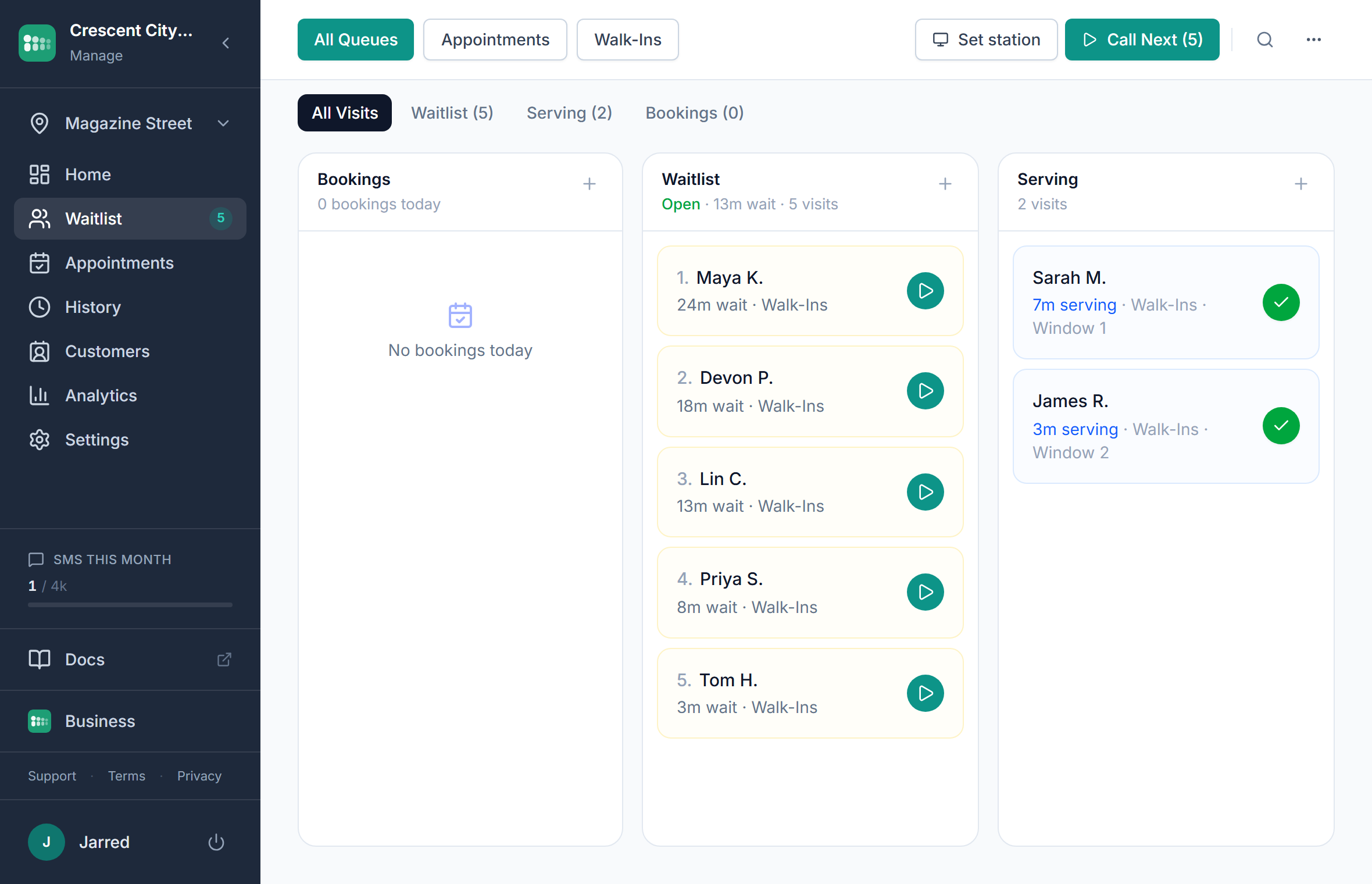
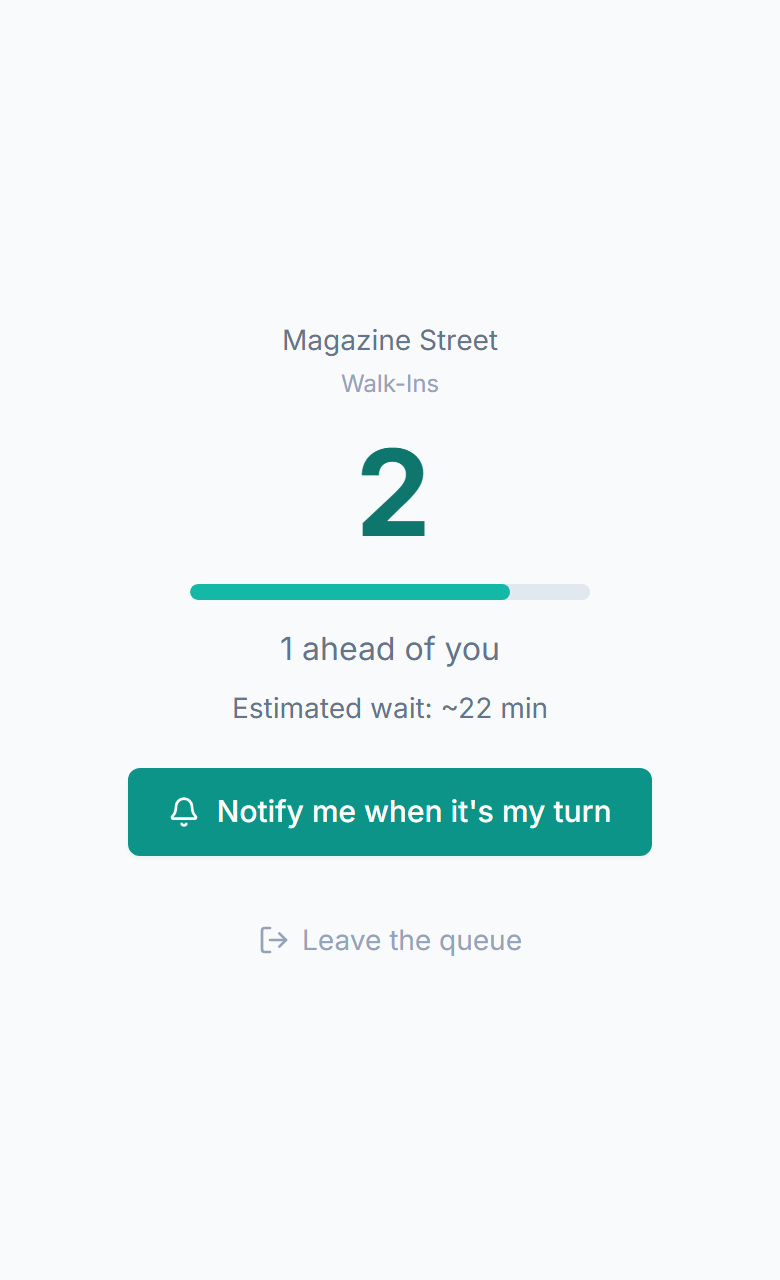
What a digital waitlist actually does
A digital waitlist replaces the paper list at your front door, and it does more than store names. When a customer joins, they get a unique link that becomes their window into your business: live position, estimated wait time, and a way to message staff. The paper version is a dead end: name goes on, name gets called. The digital version keeps the customer connected for the entire wait, so they stay informed instead of standing around guessing.
- Paper list becomes a digital sign-in: name, phone number, party size, preferences captured instantly
- Each customer gets a unique link to a live status page that updates in real time
- Two-way SMS messaging: customers ask questions, update their info, or cancel without calling
- Staff manage the list digitally: reorder, skip, message, or remove without erasing and rewriting
- The digital record persists: analytics capture wait times, no-show rates, and demand patterns
- Accessible from any device, with no special hardware, no app downloads, and no training required
Everything you need
Digital sign-in
Customers enter their name, phone number, party size, and any special requests on a simple mobile form. No paper, no pen, no illegible handwriting. Staff see clean, structured data.
Live position tracking
Each customer's status page shows their position, estimated wait, and queue movement in real time. They watch people ahead of them being served: no mystery, no anxiety.
Two-way SMS messaging
Customers reply to their confirmation SMS to update party size, ask 'how much longer?', mention a special need, or cancel. Staff respond from the dashboard, with no phone calls and no shouting.
Custom intake fields
Add fields for seating preference, service type, allergies, or anything your business needs. The information is captured at join time and visible to staff before the customer reaches the front.
Easy list management
Drag to reorder, tap to serve, swipe to remove. No erasing and rewriting. No lost entries. No arguments about who was next. The digital list is always accurate and always readable.
Waitlist history and analytics
Paper lists get thrown away. Digital waitlists generate data: average wait times, peak hours, no-show rates, popular services, and demand curves. You finally see patterns you've been guessing about.
The digital waitlist loop
The paper waitlist is a dead end. The digital waitlist creates a continuous connection between your business and each customer.
Customer scans a QR code or taps a link and fills out the digital sign-in form
They receive an SMS confirmation with their position and a link to their live status page
The status page becomes their connection to your business: position, wait time, and messaging
Customer leaves the premises or waits nearby, checking their status when they want
If they have a question, they reply to the SMS, and staff see it on the dashboard and respond
When they're approaching the front, an SMS alert brings them back and ready
After service, the interaction data flows into analytics, building a picture of your demand
How digital waitlists work across industries
Restaurant
The paper clipboard at the host stand is replaced by a QR code. Guests sign in digitally, capturing party size and seating preference. They get a text with their position and go to the bar. The host sees a clean digital list instead of crossed-out names and arrows, and seats parties in the optimal order.
Barbershop
The spiral notebook behind the counter becomes a digital list. Customers sign in from their phone and select their barber. New entries appear on the barber's screen instantly. Customers who signed up from the parking lot and customers who walked up to the counter are on the same list, with no duplication.
Clinic
The paper sign-in sheet at reception becomes a digital check-in. Patients enter their name, reason for visit, and insurance info on their phone. The front desk sees structured data, not handwritten scrawl. Patients wait in their car and message the front desk via SMS when they have questions.
Hotel
The concierge desk uses a digital waitlist for restaurant reservations, spa treatments, and activity signups. Guests join from a QR code at the desk or a link in the hotel app. They get texted when their slot is ready, with no coming back to check and no missed turns.
Event
Workshop sessions, demos, and meet-and-greets use digital waitlists for overflow. Attendees sign up, continue exploring the event, and get texted when a spot opens. The event organizer sees demand data in real time and can open additional sessions if warranted.
Retail
Product launches and limited-stock items use a digital waitlist instead of a physical line outside the store. Customers sign up from their phone, stay warm in their car, and get texted when it's their turn to enter. The store controls flow, and the sidewalk stays clear.
What digital waitlists deliver over paper
Zero lost entries
Paper lists get misread, spilled on, accidentally thrown away, or written over. Digital entries persist, are always legible, and can't be accidentally deleted. Every person who signs in is accounted for.
Two-way communication during the wait
Paper lists are one-way: name goes on, name gets called. Digital waitlists open a messaging channel. Customers ask questions, update their info, or let you know they're running late, all via SMS reply. Staff respond without phone calls.
Historical data instead of discarded paper
Every digital waitlist entry becomes a data point. After a month, you see average wait times by hour, no-show rates by day, and demand patterns by service type. Paper lists can't tell you any of this; they're in the recycling bin.
Reduced front-desk workload
Staff no longer transcribe names, manage a clipboard, shout across the room, or answer 'how much longer?' questions. The digital waitlist handles sign-in, notifications, and position tracking, freeing staff to focus on service.
Why MakeTheQueue vs. alternatives
vs Paper sign-in sheets
- Entries are always legible, structured, and permanent, not handwritten and disposable
- Customers track their own position instead of asking staff repeatedly
- SMS notifications replace name-shouting and eliminate missed calls
- Every entry generates analytics data that paper lists can never provide
vs Spreadsheet or tablet sign-in
- Customers sign themselves in from their own phone, with no shared tablet to sanitize
- Live position tracking and SMS alerts are built in, not bolted on
- The waitlist auto-advances when staff serve, with no manual cell editing
- Analytics are automatic, not a manual end-of-day tally
vs Full queue management suites
- Simple to set up: if you can use a paper list, you can use MakeTheQueue
- Free plan to start and flat monthly pricing, not enterprise contracts
- Focused on the waitlist experience, not buried under 50 features you don't need
- 2-minute setup vs. week-long onboarding processes
Frequently asked questions
A digital waitlist replaces the paper sign-in sheet at your front door with a sign-in page on the customer's own phone. Customers enter their name and phone number, see their live position, and get SMS notifications when their turn approaches. Staff manage the list from a digital dashboard instead of a clipboard.
A paper sign-in is a dead end: name goes on, name gets called. A digital waitlist is a live communication channel: customers see their position in real time, get SMS updates, can message staff, and can cancel remotely. The business gets analytics, not a piece of paper that gets thrown away.
No. Customers join through their mobile browser by scanning a QR code or tapping a link. They fill in a simple form: name, phone number, and any preferences. No app download, no account creation.
When it's a customer's turn, the system sends an SMS notification. If they don't respond or arrive within a configurable window, they're automatically marked as a no-show and the next person is notified. The no-show data feeds into analytics so you can see patterns and adjust your process.
Yes. Two-way SMS messaging is built in. Customers reply to their confirmation text to ask questions, update their party size, mention special needs, or let you know they're running late. Staff see incoming messages on the dashboard and respond without making a phone call.
Every entry records: join time, wait duration, service time, completion status (served, no-show, cancelled), party size, and any custom fields you configure. Over time, this gives you average wait times by hour, no-show rates, peak demand periods, and customer volume trends.
Built for your industry
Simple pricing. Start free, upgrade when you need more.
Start on Starter with every core feature from day one, or pick Business for analytics, exports, and multi-location. Full Business trial on every new account.
Start Free Trial