A digital line your customers join by scanning a QR code
MakeTheQueue replaces clipboards, take-a-number machines, and shouted names with a digital queue your customers join from their phone. Real-time tracking, automatic SMS, and analytics that show you exactly where time is being lost.
No credit card required · Free plan included
What queue management software actually does
Queue management software is the digital replacement for every analog system businesses use to manage waiting: paper sign-in sheets, take-a-number dispensers, pager buzzers, and the receptionist's memory. It creates a structured digital queue that customers join (via QR code, link, kiosk, or staff entry), tracks their position automatically, notifies them via SMS when their turn approaches, and gives the business a real-time operational dashboard showing wait times, throughput, and bottlenecks.
- Replaces paper lists, pagers, and shouting names with a single digital system
- Customers join via QR code, web link, kiosk, or staff entry, with no app download required
- Real-time position tracking with accurate wait estimates based on historical throughput
- Automatic SMS notifications at configurable trigger points (approaching turn, now serving)
- Staff dashboard shows the full queue, service times, and lets you reorder, skip, or reassign
- Analytics layer captures every transition (join, serve, complete, no-show) for operational insight
Everything you need
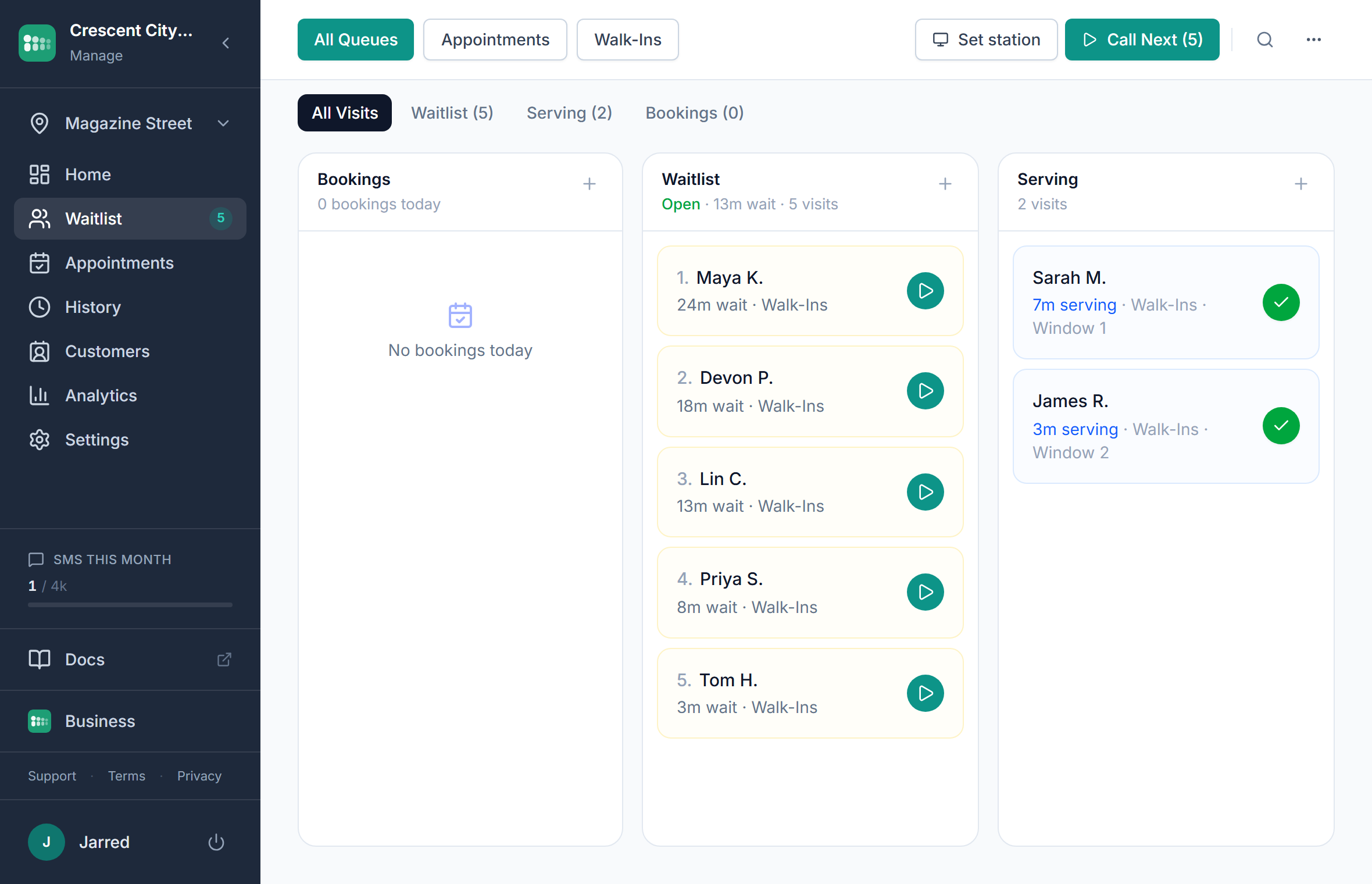
Unified queue dashboard
One screen shows every person waiting, being served, or completed. Drag to reorder, click to serve, tag by service type. No switching between tabs or tools.
Dynamic wait time estimation
Wait estimates update in real time based on actual service pace, not static averages. If your barber is running slow today, the estimate reflects it within minutes.
Multi-channel join
Customers join via QR code at the door, a link on your website, a self-service kiosk, or staff adding them manually. Every entry method feeds the same queue.
Throughput analytics
See average wait time, service duration, peak hours, and no-show rates. Drill down by day, service type, or staff member to find exactly where bottlenecks form.
Public display board
Cast a live queue display to any TV or monitor. Customers see their position, current serving number, and estimated wait, so staff stop fielding 'how much longer?' questions.
Queue lifecycle management
Handle every state transition: waiting, serving, completed, no-show, cancelled. Set automatic no-show timers, configure re-queue rules, and define escalation paths.
The queue management cycle
Every queue follows the same operational loop. Software makes each step faster, more visible, and measurable.
Customer arrives and joins the queue via QR code, link, kiosk, or staff entry
System assigns position and calculates estimated wait based on current throughput
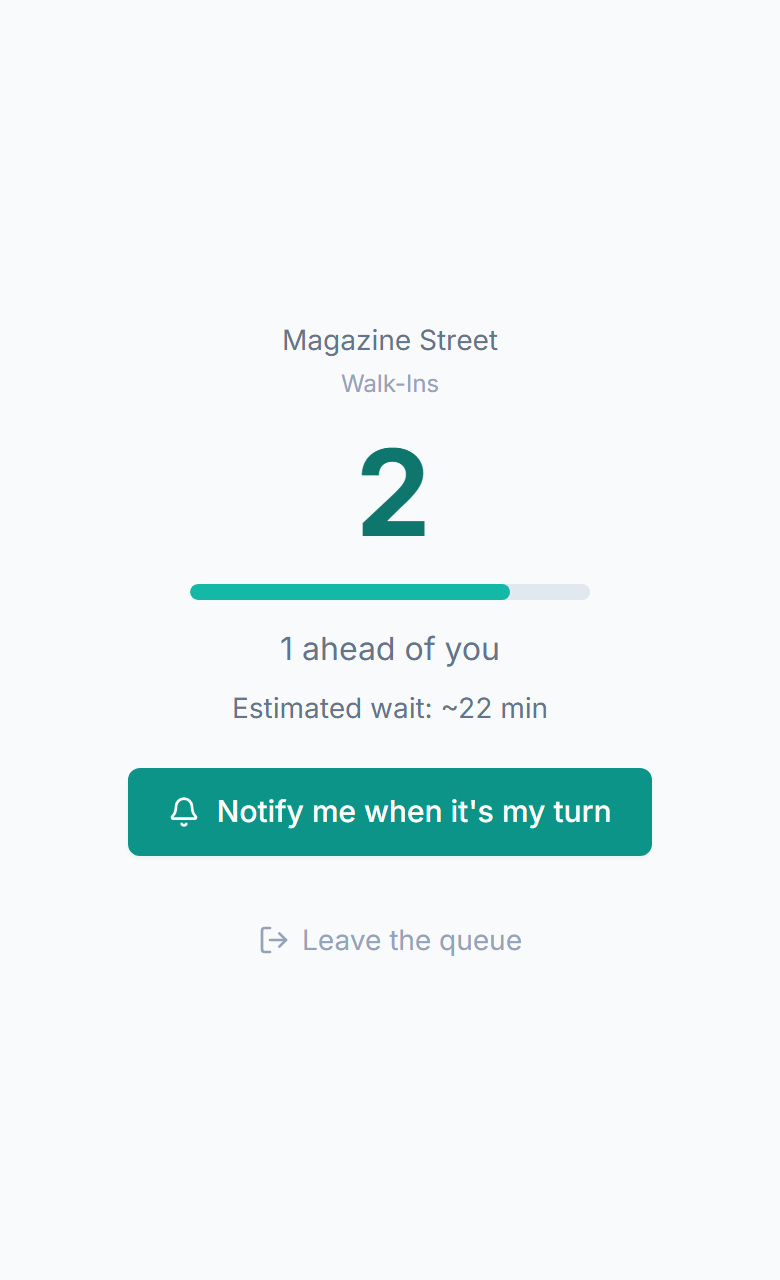
Customer receives SMS confirmation with a link to their live queue status page
As position changes, the status page updates in real time, with no refreshing needed
When their turn approaches, an automatic SMS alert brings them back to the counter
Staff serves the customer and marks them complete, triggering the next person's alert
System logs wait time, service duration, and outcome for analytics
How queue management works across industries
Restaurant
Diners join the waitlist from the parking lot. The host screen shows party sizes, seating preferences, and wait times. When a table opens, the system matches party size to table capacity and sends an SMS. No more crowded lobbies or lost parties.
Barbershop
Walk-ins join the queue and select their preferred barber. The system routes customers to the right chair based on barber availability and preference. Customers leave and come back when they get the 'you're next' text.
Clinic
Patients check in on arrival and the system tracks them through intake, waiting, and provider assignment. Staff see who's been waiting longest, which exam rooms are free, and can message patients about delays without leaving the workstation.
Hotel
Guests joining the check-in queue during peak arrival times receive a text with their position. They explore the lobby, grab coffee, or sit down instead of standing in a line at the front desk. Concierge staff manage the queue from a tablet.
Event
Registration, VIP check-in, and general admission each get their own queue. Staff see real-time throughput per line and can open or close lanes based on volume. Attendees get position updates rather than standing in uncertainty.
Retail
Customers needing fitting rooms, consultations, or pickup join a queue from their phone. Floor staff see who's waiting for what, reducing the 'can someone help me?' problem. The system captures demand patterns to inform staffing decisions.
Measurable results from digitizing your queue
Fewer walkouts
When customers can see their position and get notified, they don't leave out of uncertainty. The transparency alone eliminates the most common reason people abandon a wait: not knowing how long it will take.
Faster transitions, shorter waits
No shouting names, no searching for the next person, no wasted time between serve and arrival. The SMS alert means customers are ready when called, so the line keeps moving.
Complete operational visibility
Every queue interaction is logged with timestamps. You can see exactly when bottlenecks form, which services take longest, and how staffing changes affect throughput. Decisions move from gut feel to data.
Higher customer satisfaction scores
Perceived wait time drops when customers have information and freedom. A 20-minute wait with a live tracker and SMS alerts feels shorter than a 10-minute wait standing in an opaque line.
Why MakeTheQueue vs. alternatives
vs Paper sign-in sheets
- No lost names, illegible handwriting, or miscounted positions
- Customers track their position themselves instead of asking staff repeatedly
- Every interaction is logged for analytics, while paper lists get thrown away
- SMS notifications bring customers back without staff shouting names
vs Take-a-number / pager systems
- No hardware to buy, maintain, or replace when pagers break
- Customers keep their own phone instead of carrying a buzzer
- Range is unlimited: SMS works anywhere, not just within pager distance
- Digital queue provides wait estimates, not just a number
vs Enterprise queue platforms (Qmatic, Wavetec)
- Setup takes 2 minutes, not 2 months of hardware installation
- Free plan to start and flat monthly pricing, not five-figure annual contracts
- No kiosk hardware, ticket printers, or digital signage infrastructure required
- Built for small-to-mid businesses, not government offices and airports
Frequently asked questions
Queue management software is a digital system that replaces paper sign-in sheets, take-a-number dispensers, and pager buzzers. Customers join a queue from their phone (via QR code or link), see their position in real time, and receive SMS notifications when their turn approaches. Businesses get a dashboard to manage the queue and analytics to understand wait patterns.
It reduces wait times in two ways. First, transitions between customers are faster because SMS alerts mean the next person is already heading to the counter when called. Second, the analytics show you exactly where bottlenecks form (which hours, which services, which staff), so you can make targeted changes instead of guessing.
No. Customers join through any web browser by scanning a QR code or tapping a link. No app download, no account creation, no friction. They get a mobile web page showing their live position and a link via SMS to check back anytime.
Yes. MakeTheQueue merges scheduled appointments and walk-in arrivals into a single queue. Appointments get their reserved slot, and walk-ins fill the gaps. Staff see one unified view, with no juggling between two separate systems.
Appointment scheduling manages pre-booked time slots. Queue management handles the real-time flow of people who are present and waiting. Most businesses need both: the appointment gets the customer to show up, and the queue management handles what happens after they arrive.
Every state transition is timestamped: when a customer joins, when they're called, when service starts, when it ends, and whether they completed or no-showed. This gives you average wait times, service durations, peak hours, no-show rates, and throughput per staff member, all without manual tracking.
Built for your industry
Simple pricing. Start free, upgrade when you need more.
Start on Starter with every core feature from day one, or pick Business for analytics, exports, and multi-location. Full Business trial on every new account.
Start Free Trial